Quests
Folder: Configs/Quests/ (any file name, .cfg)
This is where you define quests themselves — what to do, what it gives, how long it lasts. A quest here is not tied to any particular NPC yet; you hand it out to NPCs separately, through Quest Profiles.
At a glance, a quest database file (Configs/Quests/starter.cfg) with a few simple quests:
[greet_elder]
Talk
A Warm Welcome
Say hello to the village elder.
"Village Elder"
Item: Coins, 10
0

[wolf_pelts]
Kill
Wolf Culling
The village needs wolf pelts. Bring me 5.
Wolf, 5, 1
Item: Coins, 50 | Skill_EXP: Bows, 20
0

[gather_wood]
Collect
Timber Run
Bring me 20 wood.
Wood, 20
Item: Coins, 30
0
...and a Quest Profile (Configs/QuestProfiles/starter.cfg) handing all three to one NPC:
[village_elder]
greet_elder, wolf_pelts, gather_wood
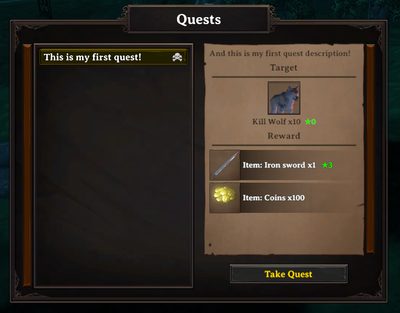
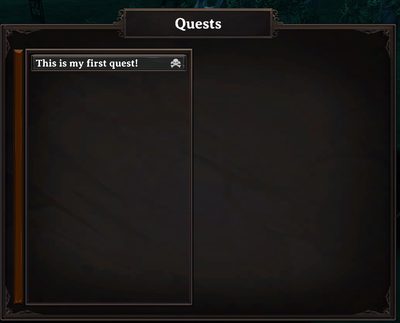
And what accepting a quest looks like from the NPC's side and the player's own journal:
| NPC's quest offer | Player's quest journal |
|---|---|
 |
 |
A complete example, explained line by line
Configs/Quests/wolf_pelts.cfg:
[wolf_pelts]
Kill
Wolf Culling
The village needs wolf pelts. Bring me 5.
Wolf, 5, 1
Item: Coins, 50 | Skill_EXP: Bows, 20
0
| Line | Content | Meaning |
|---|---|---|
| header | [wolf_pelts] |
The quest's unique ID — this is what you reference from a Quest Profile, from another quest's chain condition, or from a Quest Event. |
| 1 | Kill |
The quest type — what kind of objective this is. See Quest types below. |
| 2 | Wolf Culling |
The quest's title, shown in the quest journal. |
| 3 | The village needs... |
The description text. |
| 4 | Wolf, 5, 1 |
The target: kill Wolves, 5 of them, minimum star level 1 — see the target line format for exactly how this field works. |
| 5 | Item: Coins, 50 | Skill_EXP: Bows, 20 |
Rewards: 50 Coins and 20 Bow skill experience. |
| 6 | 0 |
Cooldown in seconds — 0 means the quest is repeatable immediately after completion. |
| 7 (not shown above, optional) | unlock requirements | Left empty here — no requirements, so this quest is available right away. See Conditions. |
If you leave off the requirements line entirely, that is fine — it defaults to "no requirements."
Quest types
There are 10 quest types. Pick the one that matches the action you want the player to perform:
| Type | What the player does | Notes |
|---|---|---|
Kill |
Kill a creature | Most common type — pairs well with Harvest for varied daily quests. |
Collect |
Hand in an item from their inventory | The items are taken away when the quest is turned in — good for "get rid of your surplus" quests, bad for anything rare or hard to get. |
Harvest |
Gather from a pickable resource (berry bush, ore vein, etc.) | Different from Collect — this is about the action of harvesting, not just owning the item. |
Craft |
Craft an item at a specific quality | Good for nudging players toward crafting/upgrading. |
Talk |
Talk to a specific NPC | Completes automatically as soon as the conversation happens — great for tutorial/intro quests in a chain. |
Build |
Build a specific structure | Resources used are not refunded if the structure is later destroyed — use sparingly. |
Move |
Reach a specific location | Good for guiding players to explore somewhere. |
KillAndCollect |
Kill a creature and also collect a matching drop | A combined objective — see the example below. |
Use |
Use a specific item or action | For item-based interactions. |
Activate |
Interact with a specific object | For activatable world objects. |
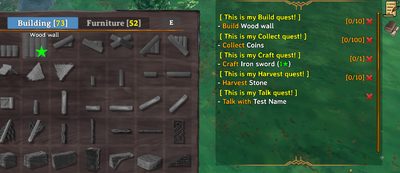
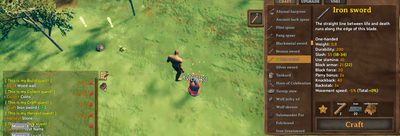
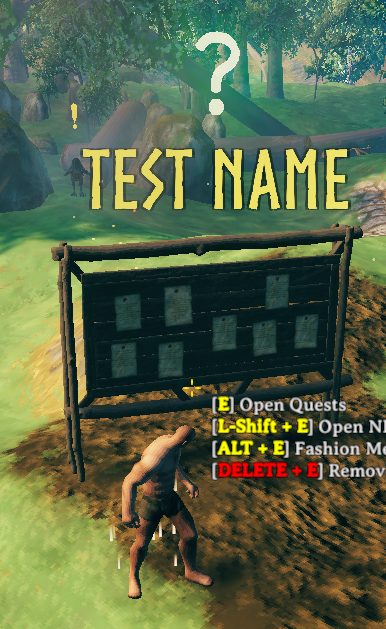
Most quest types show a marker on their target in the world, and can be toggled off per-player in Client config (Show Quest Mark):
Build marker |
Harvest/Collect marker |
Talk marker |
|---|---|---|
 |
 |
 |
The target line, by type
The target line's format depends on the quest type above it. General shape is item/creature, amount, [level], and you can list several targets on one line separated by |:
Wolf, 5, 1 | Boar, 3, 1
(kill 5 wolves and 3 boars, each at least 1-star, all counting toward the same quest)
Kill:creature, amount, level— level is the minimum star rating the creature must have, exactly as written with no hidden offset,0(or omit it) for no requirement at all.Collect/Craft:item, amount, level— level is item quality.Harvest/Build:object, amount— no level field.Talk: the full NPC name, in quotes if it has a space — e.g."Village Elder".Move:X, Z, radius, "Location Name", showOnMap—showOnMapistrue/false.Use:item, amount, extra info— the third field's exact meaning depends on what you are hooking it up to.Activate:object, extra info, extra info, ...— any fields after the first are passed along as-is.
Example: KillAndCollect
This type needs more detail per target — creature, kill count, level, then a label for the item you want collected, then any extra fields:
GoblinRaider, 5, 2, ear, none, none, none, none, none
Kill 5 at-least-2-star Goblin Raiders and collect 5 "ear" trophies (a quest-only item created just for this quest, not a real item you can get any other way). The level field here works exactly like plain Kill's, above — as of mod version 9.8.9; before that the two disagreed, see Migrations.
Reward types
You can combine several reward types on one line with |:
Item: Coins, 200 | Item: Ruby, 1 | Skill_EXP: Swords, 100
| Reward type | Format | Notes |
|---|---|---|
Item |
item, amount, [level] |
A normal item reward. |
RandomItem |
pool name |
Picks from a random-item pool you have set up elsewhere. |
Skill / Skill_EXP |
skill, amount |
Skill points / raw experience. |
Pet |
creature, amount, level |
Gives a tamed pet. |
EpicMMO_EXP / Cozyheim_EXP / Battlepass_EXP / RustyClasses_EXP |
amount |
Experience for the matching integration, if that mod is installed. |
GuildAddLevel |
amount |
Adds levels to the player's guild. |
SetCustomValue / AddCustomValue |
key, amount |
Sets/adds to a custom value — good for reputation-style systems. |
Cooldown and time limit
3600, 600
First number is the cooldown in seconds before the quest can be taken again after completion (0 = always available). Second, optional number is a time limit — how long the player has after accepting before it auto-fails (0 or omitted = no time limit).
Unlock requirements
The last line uses the condition language — this is how you build quest chains, level gates, or item-cost quests:
QuestFinished, meet_the_elder | SkillMore, Swords, 5
Only available once the player has finished meet_the_elder and has at least skill level 5 in Swords.
Special quest tags
Add one of these to the header, after =, for special behavior:
[final_boss = Autocomplete]
| Tag | Effect |
|---|---|
Autocomplete |
Completes automatically the moment the objective is met — no need to talk to an NPC to turn it in. Common for a chain's final boss fight. |
HiddenAnyCondition |
Stays hidden from the quest list unless at least one requirement currently passes. |
HiddenOtherQuestCondition |
Stays fully hidden until its chain prerequisite is met — good for not spoiling upcoming quests before they unlock. |
Without either tag, a quest whose requirements are not yet met still shows up in the NPC's list — the player just cannot take it yet. Use one of the two tags above only when you specifically want to keep a quest a surprise.
Cooldown and quest-list visibility
A quest that is on cooldown still shows in the NPC's list (with a countdown) as long as the remaining cooldown is under 5000 in-game days. Past that, it disappears from the list entirely once completed — this is the trick behind "one-time" quests: set the cooldown to something like 10000 and the quest vanishes for that player for good after their first completion, instead of reappearing once the cooldown would normally expire.
A full worked example
Configs/Quests/chain.cfg:
[wolf_pelts]
Kill
Wolf Culling
The village needs wolf pelts. Bring me 5.
Wolf, 5, 1
Item: Coins, 50 | Skill_EXP: Bows, 20
0

[timber_run = HiddenOtherQuestCondition]
Collect
Timber Run
Bring me wood and craft me a good axe.
Wood, 20 | AxeFlint, 1, 2
Item: Coins, 100 | Skill_EXP: WoodCutting, 50
3600, 600
QuestFinished, wolf_pelts
Here, timber_run stays hidden until wolf_pelts is completed, and once accepted the player has 10 minutes (600 seconds) to finish it before it auto-fails; it can then be repeated once per hour (3600 seconds).
Related
- Quest Profiles — assigning quests to an NPC.
- Quest Events — scripted reactions on accept/complete/cancel/timeout/death.
- Conditions.
- First quest guide, Quest chain guide.