Marketplace and Server NPCs (Revamped)

Marketplace and Server NPCs (Revamped) adds server-configurable NPCs and mechanics to Valheim — a player-to-player marketplace, shops, quests, dialogue trees, zones, banking, gambling, transmog, and more. Admins configure everything themselves by editing text files, and changes apply live — no server restart needed, see Hot reload.
This documentation is written for server admins — nearly every page is about config files only an admin edits. A couple of pages are the exception and matter to any player: Client config (each player's own settings — chat, keybinds, UI) and a few entries on Console commands that don't need admin access. Every page leads with practical examples rather than bare reference tables — most open with a working example you can copy and adapt.
Install the mod with Gale via Hexium, or by hand — see Installation for every option, File structure for what gets created on first run, and Server config/Client config for the settings worth a look right away (admin access, currency, taxes, and the rest).
There is no in-game editor: quests, dialogues, zones, NPCs, and everything else below are built by editing plain text config files that the mod picks up live (see Hot reload for exactly what that covers) — see Content creation for how it all fits together, including config file syntax, profiles, conditions, commands, prefabs and text markup, custom assets, and scheduling a config to a time window.
Key features
Core: NPCs, quests, dialogue & factions
- NPC system — placeable NPCs: type, appearance, dialogue, map pin, patrol, visibility condition. Placed with the Marketplace Hammer build tool. Reusable setups: Saved NPCs. Idle chatter: Random NPC Speech. Player-summoned instead of admin-placed: Spawned NPCs.
- Quests — the full quest system, 10 quest types. Assigning quests to an NPC: Quest Profiles. Scripting what happens on accept/complete/cancel: Quest Events. Walkthroughs: Your first quest, Quest chains.
- Dialogues — branching NPC conversations, with conditions and scripted actions. Attaching extra data to something a dialogue spawns: Custom Spawn Data. Walkthroughs: A branching dialogue tree, Dialogue patterns, Tracking player state.
- Factions — player factions with shared perks, restricted items, and friendly monsters, joined and checked through the same Dialogues/Quests commands and conditions above.
Economy: shops, currency & rewards
- Marketplace — the player-to-player auction house. Works immediately with no setup; tax and listing-limit settings live in the server config.
- Traders — an NPC shop with a fixed buy/sell list.
- Bankers — deposit and withdraw currency, with periodic interest.
- Gamblers — spend an item, get a randomized reward.
- Buffers — an Enchanter NPC that sells temporary buffs. Choosing which buffs an NPC offers: Buffer Profiles.
- Transmogrification — change how an item looks without changing its stats.
Walkthrough tying these together: Shops, currency, and taxes.
World: zones, travel & server info
- Server Info — rules and announcement boards.
- Teleporters — a fast-travel hub NPC.
- Territories — named zones with behavior flags: PvP rules, healing auras, biome overrides, and more.
Walkthrough: Setting up a territory.
Server utilities & extras
- Player Tags — name-tag prefixes per player, like
[Admin]or[Trusted]. - Synced Localizer — server-wide text overrides, sent to every player automatically.
- Console commands — admin and debug commands.
- Discord Webhooks — posts marketplace sales, gambler wins, and quest completions to a Discord channel.
UI panels
- Mail — send items and messages between players. Works immediately; mailbox recipe and timing live in the server config.
- Feedback — a feedback form that posts to a Discord webhook. Works immediately; the webhook link lives in the server config.
- Chat — a replacement chat window. Client-side settings only.
- Distanced UI — open shop/quest/mail menus without a nearby NPC, and spawn a Spawned NPC for yourself.
- Leaderboard Achievements — server-wide leaderboards and achievements.
How to read a config page
Most config pages above follow the same shape:
- A working example, explained piece by piece.
- A table of every option/value you can use.
- Anything that behaves in a way you might not expect.
- Links to related pages.
Every config example is written with generous spacing (Key: Value | Key2: Value2 rather than Key:Value|Key2:Value2) — spaces around punctuation are always safe to use in your own files and make them much easier to read later.
Tooling
- VS Code extensions — editor extensions, starting with syntax highlighting.
- Coming soon — AI-assisted config generation and a visual config editor, planned but not built yet.
For mod developers
- Integrating with this mod — what other mods can read and change.
Reference
- Localization keys
- Changelog
- Migrations — what to do when updating across a version with a breaking change
- Known gaps — current-version quirks and things that look like they should work but do not
What it looks like
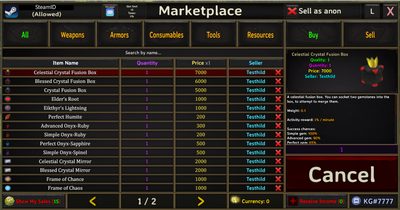 |
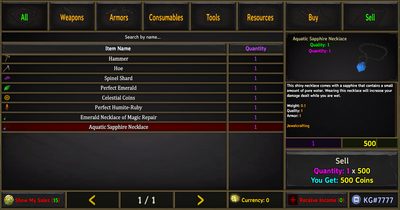 |
More screenshots for a specific module live on that module's own page — see Key features above.
Prefer watching over reading? See Video guides for community walkthroughs.
Want to ask an AI about this mod instead of reading? Every page has a "Use with AI" bar at the top — copy that page as Markdown, open it directly in ChatGPT/Perplexity/Grok, or paste it into Claude/Gemini. To hand an AI the whole documentation at once, grab /llms-full.txt (one file, everything); for just a linked index, see /llms.txt.
Support the author
If this documentation or the mod itself saved you time, consider supporting KG, the mod's author:
- Discord: discord.gg/QgvSmhkbmy — questions, comments, community help
- Donate: PayPal —
war3spells@gmail.com